One photo, one mic, your verse

AI Rapper Video Generator

Upload one photo and become the rapper. The AI puts you behind the mic in the orange studio, nodding, pointing and rapping a 15-second verse over a boom-bap beat.

Example · AI-generated 0:15

15s · 720p · 100 credits

Allow about 5–10 minutes. This is an estimate; busy periods may take longer. Your task keeps running after you leave; find it in My videos.

Buy credits · no subscription

15-second landscape MP4 (16:9) with beat and vocals. Uploaded photos are deleted automatically after 24 hours.

  • ✓ One photo · 15-second video with sound
  • ✓ Photos deleted after 24 hours
  • ✓ Unofficial, independent tool

AI Rapper Video video example
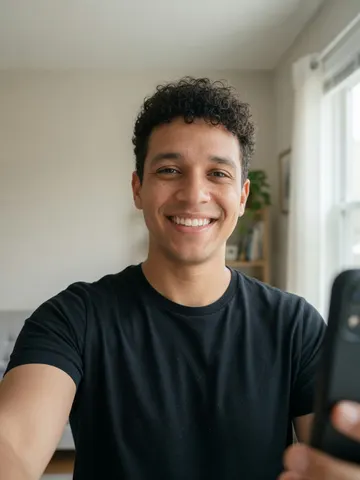
Input photo: a man in a black T-shirt
One selfie in: the rapper is rebuilt from the photo, while the verse, the mouth movements, the gestures, the beat and the camera stay. A 15-second landscape MP4.

What is the AI Rapper Video trend?

An AI rapper video turns a single photo into a clip of you rapping. AI rebuilds the performer from your photo, with your face, hair and clothing colors, and keeps the verse, the mouth movements and the moves. You don’t need to rap, film or edit: people use it for hype clips, birthday shout-outs, their pets and their avatars.

This template is our own solo performance in the same burnt-orange studio as our Hotel Lobby AI duo, with original lyrics and a boom-bap beat. Your photo replaces the rapper; the head nods, the pointing at the camera and the raised hands on the last line stay.

How to make the AI Rapper Video video

Option 1: One photo with this generator

  1. Upload a clear, front-facing photo of one person, pet or character.
  2. The Generate button shows the exact credits before you start.
  3. Generate. Allow about 5–10 minutes; you can close the page and find the result in My videos.
  4. Download the MP4 and post it.

Option 2: A talking-photo or lip-sync tool

Upload a photo and an a cappella rap, and the tool moves the mouth to the audio. You need your own vocals, and usually only the face moves, not the body or hands.

Option 3: A music video generator

If you already have a track, some tools turn your song into a full music video with an AI performer. Good for your own music, but expect more settings and longer renders.

Option 4: Film it yourself

A plain wall, a phone on a tripod and a beat on a speaker. Learn a short verse, record a few takes and keep the best one.

AI Rapper Video prompt

Using a reference-video tool? Upload a reference clip as the reference video and your photos as reference images, then use this prompt. It is the tested prompt behind our generator, rewritten for general use.

Replace the rapper with the person in the reference image. Keep their face, hair and outfit consistent from the first frame to the last. Preserve the performance: the timing, mouth movements in time with the verse, head nods, hand gestures, pointing at the camera and raised hands. Keep the plain burnt-orange studio, the microphone on its stand and the locked-off camera. No new people, captions or cuts.

FAQ

AI Rapper Video questions

What is the AI Rapper Video trend?

+

An AI rapper video turns a single photo into a clip of you rapping. AI rebuilds the performer from your photo, with your face, hair and clothing colors, and keeps the verse, the mouth movements and the moves. You don’t need to rap, film or edit: people use it for hype clips, birthday shout-outs, their pets and their avatars.

What does the rapper say?

+

A short original verse we wrote about stepping into the booth and going viral. Every video uses the same verse and beat; it isn’t any real artist’s lyrics or voice.

Can I make my dog or cat a rapper?

+

Yes. Upload a sharp photo of your pet with the whole face visible. The AI keeps their recognizable features and adapts the performance to them; results are a little less predictable than with people.

Can I rap with a friend instead?

+

Yes, with our Hotel Lobby AI template: upload one photo for the left rapper and one for the right, and you trade verses at one mic.

Is the AI Rapper Video video generator free?

+

There’s no free tier. A video costs 100 credits for a 15-second 720p video, paid with one-time credit packs from $5.90. No subscription, credits are valid for 12 months, and failed videos are refunded automatically.

What photo should I use?

+

A sharp, front-facing photo of one person, pet or character with the face fully visible, in even light. JPG, PNG or WebP up to 4 MB. Avoid sunglasses, group shots and heavy filters.

Is there a watermark?

+

No. AI Rap Video doesn’t add a watermark or logo; you download a clean MP4 ready to post.

Do I need to download an app?

+

No. AI Rap Video works in the browser on your phone or computer: upload photos from your camera roll, then download the MP4 and post it.

How long does it take?

+

Allow about 5–10 minutes per video; busy periods may take longer. Once your task is confirmed you can close the page and download the result later from My videos.

Does the video include sound?

+

Yes. The 15-second MP4 comes with our own beat and rap vocals. When posting on TikTok or Reels you can also pick the trending sound so your video shows up on its sound page.

Can I use my pet or a cartoon character?

+

You can try a clear photo of a pet or your own cartoon or 3D character. Results are less predictable than with human photos, so use one where the whole face or head is visible.

Is this official?

+

No. AI Rap Video is an independent tool. It is not affiliated with, endorsed by or connected to any artist, show or label.